


NovelBar-Your Reading Haven
3.5831.00 Reviews
App Specs
- Version
- 2.2.2
- Updated On
- License
- Free
- Downloads
- 500,000+
- Developer
- Q- VOR PTE. LTD.
- Categories
- Books & Reference
- Platform
- Android, iOS
Screenshots



 Analysis by AppCompare
Ever stumbled upon an app that feels like it was tailor-made just for you? That’s how I felt when I first dove into NovelBar-Your Reading Haven. It’s not just another reading app; it’s a cozy corner where literature lovers can find solace. Let me take you through my experience with this gem.
What I look for before settling into a reading app
With a novel app, I care about more than whether I can open a story and keep reading. I want to know what kind of reading it suits, how easily I can browse when I have only a few minutes, and whether the experience fits my habits without nudging me into spending more than I planned. NovelBar is a free Books & Reference app from Q- VOR PTE. LTD., and it focuses on novels across genres. That makes it a natural candidate for readers who want fiction close at hand, rather than a general-purpose reference tool or a shop centered on print books.
Its audience is broad, but the content rating is Teen, so I would not treat it as a reading space designed specifically for young children. The app has an average rating of 3.6 from around 3,100 ratings, with about 735 written reviews and over 500,000 installs. Those figures suggest that it has found an audience, while the mixed average is a reason to decide based on your own reading preferences rather than assume every reader will have the same experience.
I also keep the commercial side in mind. The app is free to install, but it offers in-app purchases ranging from $0.99 to $284.99 per item. That wide range makes it sensible to check the price shown for any purchase before confirming it. If I were trying the app for the first time, I’d begin with the free experience and set a personal spending limit before exploring paid options. That small habit keeps discovery fun and makes it easier to distinguish enjoying a story from feeling committed to buying more of it.
Getting Started: A Warm Welcome
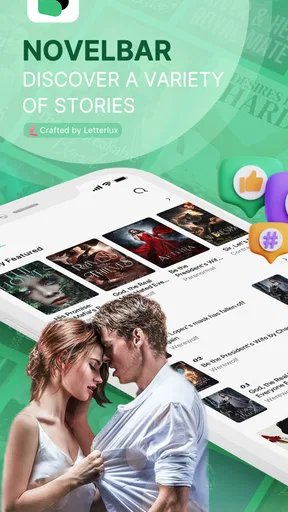
From the moment I installed NovelBar, the interface was like a breath of fresh air. It’s minimalistic, yet vibrant enough to catch your attention without overwhelming you. Navigating the app felt as smooth as flipping through the pages of a well-worn book. Setting up my preferences was a breeze, and before I knew it, I was swiping through a vast library of books.
A Library at Your Fingertips
One of the things I instantly loved about NovelBar-Your Reading Haven is the sheer variety of genres available. Whether you’re into thrillers, romance, sci-fi, or even niche genres, there’s something here for everyone. What’s even cooler is the personalized recommendations. The algorithm seems to know my taste better than I do! I found myself lost in stories I never would’ve picked up otherwise.
The app also supports multiple languages, which is fantastic for those who like to read in their native tongue or are trying to learn a new one. This inclusivity is a big win in my book.
Worth Reading Before You Choose

EA SPORTS FC Mobile 26 Is a Bigger Football Game, but It Takes Time

Flipboard Shows What News Apps Must Do Beyond the Feed

Switching to Android Auto Means Rethinking Your Driving Routine

Google Calendar Makes a Crowded Week Easier to Manage

Ludo King Makes the Most of the Minutes Between Plans

Baby Panda World Brings Quick Play to Modern Phones, but Its Game Library Feels Busy
Finding a story without losing your evening
That broad browsing choice is most useful when I give myself a small, practical goal instead of trying to inspect everything at once. If I have a short break, I’ll look for a genre or mood I already enjoy, then sample a story before deciding whether it deserves a longer session. When I’m in the mood to experiment, I’ll let recommendations take me outside my usual picks, but I don’t treat a suggested title as a guarantee that it will suit me. The useful balance is to let discovery provide a shortlist and use my own judgment to choose what to continue.
This approach also helps answer a common question: is this better for readers who already know what they like, or for people looking for something new? I think it can serve both, though in different ways. A familiar genre gives an established reader a quick route to a likely match; recommendations can give a curious reader a starting point for exploring. If you need a tightly curated catalogue of specific authors, editions, or literary criticism, a dedicated bookseller or library catalogue is likely a better fit than a novel-first browsing app.
Features that Enhance the Experience
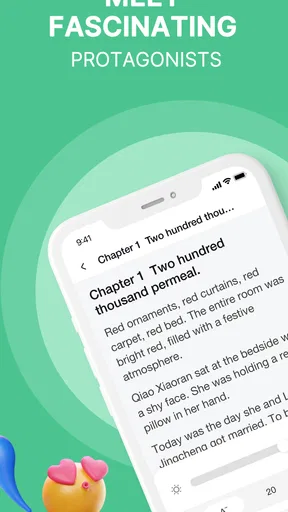
Reading on a mobile device can sometimes be a strain, but NovelBar has thought of everything to keep your eyes happy. You can adjust the font size, style, and background color to suit your preference, making those long reading sessions less taxing. The night mode is a lifesaver for late-night readers like myself.
Another feature that stood out is the offline reading option. Let’s face it, not everywhere has Wi-Fi, and when you’re deep into a gripping storyline, the last thing you need is connectivity issues. Just download your favorites, and you’re good to go.
A practical routine for reading on the go
For a commute or a waiting room, I’d make the display comfortable before settling in rather than changing settings midway through a chapter. Font size and background are personal choices, but testing them in the lighting where I actually read is more useful than choosing a setup only because it looks attractive at home. A darker appearance can be comfortable in the evening, while a brighter one may suit daytime reading. These options matter because they let the screen adapt to the reader, rather than asking the reader to tolerate a single presentation.
Offline reading is especially helpful when I know I’ll be without a reliable connection, but it calls for a little planning: save the story I want while I’m connected, then check that it is available before I leave. I wouldn’t assume that every title is already stored on the device just because offline reading is supported. This is a small but meaningful distinction for someone boarding a train or heading somewhere with patchy reception. For a reader who prefers not to prepare in advance, a paper book or an ebook already stored locally may be the more dependable choice.
A realistic use case is a busy weekday: I might browse during lunch, choose a story, adjust the text for a comfortable screen, and read a few pages during the trip home. If the connection drops, a previously downloaded title can keep that routine intact. The app’s strengths here are convenience and flexibility, not a promise that every part of the experience works in every situation. I’d still keep another reading option available for a long journey where uninterrupted access matters.
Community and Interaction
What sets NovelBar apart is its interactive community features. You can join book clubs, participate in discussions, and even share your thoughts on what you’re reading. It’s like having a book club in your pocket. The app encourages a sense of community among its users, making reading a shared experience rather than a solitary one.
Plus, there are periodic challenges and events that keep things exciting. It’s a fun way to discover new books and interact with fellow bookworms.
Choosing how social your reading should be
Community features can make a serial reading habit feel less solitary, especially if I enjoy talking through a plot or seeing what other readers are choosing. They are also optional in spirit: I can approach the app primarily as a place to read and take part in discussions when that adds something to the story. I’d avoid assuming that every club or conversation will match my interests; the value of a community depends on the people and titles involved, so it makes sense to try participation lightly before making it part of a routine.
Challenges and events can give me a prompt when I’m unsure what to read next, but I wouldn’t let a reading target turn leisure into another obligation. A useful personal rule is to treat a challenge as an invitation, not a quota. If a story stops being enjoyable, there is no benefit in continuing just to keep a streak or finish an activity. Readers who prefer quiet, uninterrupted reading can simply focus on the books, while those who like exchanging reactions may find the social layer a welcome extra.
Little Extras That Matter
One of the delightful surprises was the built-in dictionary feature. Whenever I stumbled upon a word that left me scratching my head, a quick tap would reveal its meaning. This turned my reading sessions into a learning experience, making me feel smarter with every page.
The app also keeps track of your reading habits and provides insightful stats. It’s interesting to see how much time I’ve spent reading and how that stacks up against my goals. It’s like having a personal cheerleader encouraging me to read more.
Using reading tools without turning reading into homework
The dictionary is most helpful when I use it selectively. Looking up every unfamiliar word would interrupt the flow of a chapter, so I’d tap for a meaning when the word is important to understanding a scene or when I genuinely want to learn it. For a language learner, that can make fiction more active and engaging; for someone reading purely to unwind, skipping occasional unfamiliar words may be the better trade-off. The tool adds value when it serves the reader’s purpose instead of dictating a study routine.
Reading statistics can similarly help me notice a pattern, such as whether I tend to read in short bursts or make more time on certain days. I’d use that information as a gentle reflection, not as a measure of whether I’m a “good” reader. If tracking makes the experience feel like another task, it is reasonable to pay less attention to it and simply enjoy the story. The practical benefit is awareness; the trade-off is that numbers can distract if I care more about the record than the reading itself.
Privacy, spending, and visible choices
When an app combines reading with recommendations, a community, and habit tracking, I think about what I choose to share and how I use those features. I can make deliberate decisions about whether to join discussions, post thoughts, or take part in events, rather than treating every social option as necessary. Before posting, I’d keep comments focused on the book and avoid sharing personal details that do not belong in a reading discussion. That is a sensible habit in any online community, especially one built around casual conversation.
I would also review the app’s current permission prompts and account settings on my device, and grant access only when I understand why it is being requested. I can’t infer privacy practices from the reading features alone, so I would make decisions based on the controls and explanations actually shown in the app. The same caution applies to purchases: a free starting point is useful, but the listed purchase range makes checking each item’s price worthwhile. I’d avoid tapping through a payment screen on autopilot and confirm the amount before proceeding.
Version 2.0.4 is the current version I have in mind when describing the app, and it runs on Android 6.0 or later. The version detail is useful if someone is checking device compatibility, but I’d still make sure the app is available for the device they intend to use. It was released on August 31, 2023, and its Teen content rating is another reason I would consider the intended reader before recommending it to a family. Those details do not replace checking the content of a particular story; they simply help set expectations about the app as a whole.
Who will get the most from it?
I’d recommend trying NovelBar if you mainly want fiction on your phone, enjoy browsing across genres, and like the option of reading socially without needing a separate book club. The combination of adjustable text, offline reading, a dictionary, and reading stats gives different kinds of readers a few practical ways to shape the experience. A commuter may value downloaded chapters, a language learner may make occasional use of the dictionary, and a reader who likes group conversation may find the clubs and discussions appealing.
I’d be more cautious if I wanted a service focused on scholarly reference, a catalogue organized around particular publishers, or a reading experience with no social or purchase elements at all. Someone who is sensitive to spending prompts should decide in advance whether they intend to make in-app purchases and review each price carefully. And if I want to read only books I already own, a local ebook reader may suit me better: it keeps the focus on my existing files rather than discovering novels within an online platform.
Ending Thoughts
In a world cluttered with apps vying for attention, NovelBar-Your Reading Haven is a refreshing find. It’s more than just a reading app; it’s a community, a teacher, and a companion on your literary journey. Whether you’re a casual reader or a bookworm, I’d highly recommend giving NovelBar a try. It’s like having a library in your pocket, ready to whisk you away on countless adventures.
So, what are you waiting for? Dive into the world of NovelBar and let your reading journey unfold. Who knows, you might just find your next favorite book waiting for you!
My cautious recommendation
My enthusiasm comes with a clear boundary: I’d treat it as a place to explore and read novels, not as a replacement for every reading tool or as a reason to spend. The app’s broad genre browsing and reading conveniences make it worth considering for people who read fiction in spare moments. The choice to participate in social features, use the dictionary, or track habits can be guided by what actually improves the experience for me, rather than by trying to use every feature.
If I were recommending it to a friend, I’d suggest starting with a story that already fits their taste, trying the display controls, and seeing whether the reading rhythm feels comfortable. Then they can decide whether recommendations, discussions, and other extras add enough value to keep using it. That gradual approach is a good way to judge a novel app personally, particularly when optional purchases are available. For the right reader, NovelBar can make it easier to keep a story close; for someone who values a private, entirely offline library or wants reference books, another kind of app will make more sense.
Pros
- Wide variety of genres available.
- User-friendly and intuitive interface.
- Offline reading mode supported.
- Customizable reading settings.
- Regularly updated with new titles.
Cons
- Limited free content available.
- Ads can be intrusive at times.
- Requires stable internet for downloads.
- In-app purchases can be pricey.
- No audiobook feature available.
FAQs for NovelBar-Your Reading Haven
What is NovelBar and how does it enhance my reading experience?
NovelBar is a comprehensive reading app designed for book lovers, offering a vast library of novels across various genres. It enhances your reading experience by providing personalized recommendations, adjustable reading settings (like font size and background color), and offline reading options. This ensures that you can enjoy your favorite stories anytime, anywhere.
Is NovelBar available for both Android and iOS devices?
Yes, NovelBar is available for download on both Android and iOS platforms. You can find it in the Google Play Store for Android users and the Apple App Store for iOS users. The app is optimized to work seamlessly on smartphones and tablets, providing a user-friendly interface across devices.
Does NovelBar offer any subscription models or is it free to use?
NovelBar provides both free and premium subscription options. The free version offers access to a limited selection of novels, while the premium subscription unlocks the full library and additional features like ad-free reading and early access to new releases. Users can choose a plan that best fits their reading habits and budget.
Can I customize my reading experience on NovelBar?
Absolutely! NovelBar allows you to customize your reading experience extensively. You can adjust text size, choose from various background colors, and switch between day and night modes to reduce eye strain. These customization options ensure that every reader can tailor their experience to their personal preferences.
Are there any community features available on NovelBar?
Yes, NovelBar includes community features that enhance the social aspect of reading. Users can join discussion forums, leave reviews, and share recommendations with other readers. This fosters a sense of community and allows you to engage with fellow book enthusiasts, making the reading experience more interactive and enjoyable.


